

Download Inventarios Total – Free Inventory Management Software for Windows, Mac, Android & iOS
Inventarios Total is a powerful, free business and productivity software designed to streamline inventory management across departments, manufacturers, and supply chains. Whether you're a small retailer, a growing startup, or a large enterprise managing multiple warehouses, Inventarios Total offers a scalable solution with customizable reports, real-time tracking, and secure data backups. With support for Windows, Mac, Android, and iOS, this versatile tool ensures seamless access from any device. Unlike basic tools like Simple Inventory Manager, Inventarios Total provides advanced features such as unlimited departments, multi-user collaboration, and detailed analytics—making it ideal for complex business operations. Its intuitive interface and robust security make it a top choice for organizations seeking efficiency, accuracy, and long-term scalability.
Key Features of Inventarios Total
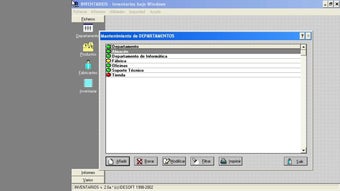
One of the most compelling reasons to download Inventarios Total is its rich set of features tailored for modern inventory challenges. First, the software supports unlimited departments, allowing businesses of any size to organize their inventory by location, product line, or team. This feature is especially beneficial for multi-location retailers or manufacturing firms with various production units. Each department can have its own product list, pricing, and reorder thresholds, ensuring accurate tracking without cross-contamination of data.
Another standout feature is customizable reporting and preview tools. Users can design reports that match their business needs—whether it’s a daily sales summary, a monthly stock audit, or a supplier performance analysis. The preview function lets you see exactly how your printed documents will look before hitting print, saving time and reducing errors. This is a game-changer for businesses that rely on physical documentation for audits or client presentations.
Inventarios Total also includes secure backup and recovery mechanisms. Your inventory data is protected with automated backup options, ensuring that even in the event of hardware failure or cyberattacks, your records remain intact. This level of data security is crucial for compliance and continuity, especially in regulated industries.
Additionally, the software offers multi-user access with role-based permissions, allowing team leaders to assign different levels of access to employees. For example, a warehouse manager can view stock levels and generate reports, while a finance officer can only access financial summaries. This enhances both security and accountability.
Lastly, cross-platform compatibility is a major advantage. Whether you’re working on Windows, Mac, Android, or iOS, Inventarios Total ensures consistent performance. This flexibility allows teams to collaborate in real time, whether they’re in the office, on the road, or working remotely.
How to Install and Use Inventarios Total
Getting started with Inventarios Total is straightforward, though a bit more involved than basic apps due to its advanced functionality. First, visit the official website and download the appropriate version for your operating system—Windows, Mac, Linux, or Novell. The installation process is smooth, with a guided wizard that walks you through each step. Once installed, launch the app and create a new inventory database or import an existing one.
The initial setup involves defining your departments, product categories, and suppliers. This is where the customization begins. You can add custom fields such as batch numbers, expiry dates, or serial numbers—ideal for food, pharmaceuticals, or electronics businesses. After setting up your structure, begin entering products manually or import them via CSV or Excel files for faster onboarding.
Once your inventory is live, you can start tracking stock movements. Use the built-in stock adjustment tool to update quantities after physical counts, or log incoming and outgoing shipments directly. The software automatically updates stock levels in real time, reducing human error and ensuring accuracy.
For daily operations, use the quick search and filter system to locate products instantly. Generate reports with a few clicks—choose from predefined templates or build your own. The print preview feature ensures your documents look professional before printing.
Regular updates are released to improve performance, fix bugs, and enhance security. To stay current, enable automatic updates in the settings. This ensures you always have access to the latest features and protection against vulnerabilities.
Compatibility and System Requirements
Inventarios Total is built for broad accessibility, supporting a wide range of platforms and devices. It runs smoothly on Windows 7 and later, including Windows 10 and 11. Mac users can install it on macOS 10.14 (Mojave) and above, making it compatible with both Intel and Apple Silicon Macs. For Linux users, a native version is available for Ubuntu, Debian, and other major distributions, ensuring that open-source environments aren’t left behind.
Mobile users are not forgotten—Inventarios Total offers dedicated apps for Android and iOS. These mobile versions sync seamlessly with the desktop software, allowing warehouse staff to scan barcodes, update stock, and generate reports on the go. The mobile interface is intuitive, with touch-friendly controls and offline mode support, so you can work even without internet access.
For enterprise environments, the software integrates with Novell NetWare servers, enabling centralized management across large networks. This makes it a solid choice for schools, hospitals, and government agencies that rely on legacy systems.
System requirements are modest. You’ll need at least 2 GB of RAM, 500 MB of free disk space, and a stable internet connection for updates and cloud backups. The software doesn’t require a powerful GPU, making it accessible even on older hardware.
Pros and Cons of Inventarios Total
- Pros:
- Free to download and use with no hidden fees
- Supports unlimited departments and customizable product lists
- Advanced reporting with print preview and export options
- Secure data backups and role-based user access
- Available on Windows, Mac, Android, iOS, and Linux
- Real-time stock tracking and multi-user collaboration
- Mobile app for on-the-go inventory management
- Regular updates and strong community support
- Cons:
- Initial setup requires some learning curve
- No built-in barcode scanner integration (requires third-party tools)
- Customer support is limited to forums and documentation
- Advanced features may overwhelm beginners
- Cloud sync not included in free version (local backups only)
Frequently Asked Questions (FAQ)
- Is Inventarios Total really free to download and use?
Yes. Inventarios Total is completely free to download and use. There are no subscription fees or hidden costs. The software is supported by a community-driven model and optional premium add-ons for advanced features.
- Can I use Inventarios Total on my Android or iOS device?
Yes. Dedicated mobile apps are available for both Android and iOS. These apps sync with your desktop version, allowing you to manage inventory from anywhere, even offline.
- Does Inventarios Total support barcode scanning?
Not directly. The software doesn’t include built-in barcode scanner support. However, you can use third-party apps or hardware scanners that integrate with the system via keyboard input or file import.
- Can multiple users work on the same inventory database?
Yes. Inventarios Total supports multi-user access with role-based permissions. Team members can work simultaneously, with data syncing in real time across devices.
- Is there a cloud backup option?
Not in the free version. Cloud backup is available as a premium feature. However, local backups are fully supported and can be scheduled automatically.
- How often are updates released?
Updates are released monthly. These include bug fixes, security patches, and new features. Automatic updates are recommended for optimal performance and safety.
Conclusion: Why Inventarios Total Stands Out
Inventarios Total is more than just an inventory tool—it’s a complete business efficiency solution. With its robust feature set, cross-platform availability, and strong focus on security and scalability, it outshines simpler tools like Simple Inventory Manager. Whether you’re a small business owner tracking stock levels or a large corporation managing global supply chains, Inventarios Total adapts to your needs.
While the initial learning curve may be a minor hurdle, the long-term benefits—accurate tracking, real-time collaboration, and customizable reporting—far outweigh the effort. The free version offers exceptional value, and with regular updates, it continues to evolve.
Download Inventarios Total today and take control of your inventory with confidence. It’s the secure, reliable, and future-ready software your business deserves.







